

Quick answer:
‘In transit’ means a package has left the sender’s location and is actively moving through the carrier’s network toward its destination. The package has been accepted and scanned by the carrier, is moving between sorting facilities, and has not yet reached the final delivery point. At USPS specifically, ‘In Transit’ and ‘In Transit to Next Facility’ are tracking statuses that appear at multiple points during a shipment’s journey, not just once. ‘In Transit to Next Facility’ is often a placeholder message the USPS system generates when no physical scan has occurred in the past 24 hours, which is normal for cross-country ground shipments. The status updates to ‘Out for Delivery’ when the package is loaded onto the local delivery vehicle for that day’s delivery.
How long packages stay in transit depends on the service level: USPS Priority Mail Express delivers next-day to 2-day; USPS Priority Mail takes 1-3 business days; First-Class Mail takes 1-5 business days; USPS Ground Advantage takes 2-5 business days; Retail Ground takes 2-8 business days. FedEx and UPS have comparable domestic transit times by service level. If a package has not received a scan update for 7+ days, contact the carrier. If no update for 30+ days, file a missing mail search request.
Key Takeaways
- What ‘in transit’ means: The package is in the carrier’s possession, moving between facilities, and has not yet been delivered. It is not lost: it is on its way.
- ‘In Transit to Next Facility’ is often a placeholder: At USPS, this specific status frequently appears when no physical scan has occurred in 24+ hours. It is a system-generated message meaning ‘no new scan data available, but the package is moving.’ This is normal for cross-country ground shipments that can travel for days without a new scan.
- In transit is not the same as out for delivery: ‘In transit’ means the package is still moving through the network. ‘Out for delivery’ means it has reached the local delivery vehicle and will be delivered today. These are distinct stages: a package can be ‘in transit’ for days before moving to ‘out for delivery.
- ‘ WISMO contacts peak during in-transit status: When a package status shows ‘in transit’ without a tracking update for 24-48 hours, customers often contact support. Proactive shipping notifications that communicate expected delivery dates and explain normal scan gaps reduce these contacts without requiring any additional support team involvement.
- For CX teams: set expectations before customers ask: The most effective CX response to in-transit questions is a proactive one: sending an automated notification when a shipment enters transit that includes the expected delivery window and a link to live tracking. LateShipment.com’s OneTrack triggers these notifications automatically on carrier scan events.
What “In Transit” Really Means
You place an order, get the confirmation email, and click through to tracking. For the next few days, the page keeps showing the same thing: “In transit.”
From a shopper’s point of view, that line can feel like a shrug. Is the package moving? Is it sitting in a corner of some warehouse? Did someone misplace it?
For retailers, that same vague status is where a lot of support volume and bad experiences start. Customers don’t complain when they clearly see “Out for delivery” or “Delivered”. They complain when all they see is “In transit” and nothing seems to change.
To fix that, it helps to understand what “in transit” actually covers in the delivery journey — and what you can realistically do when it seems to be stuck.
What Does “In Transit” Actually Mean on Your Tracking Page?
Every parcel goes through a basic lifecycle: the order is placed, picked and packed, handed off to the carrier, moved through a network of hubs, and finally sent out on a local delivery route.
“In transit” is the umbrella status that covers almost everything that happens between the carrier’s pickup scan and your local depot’s “Out for delivery” scan. That can mean the package is:
- Moving by truck, air, or linehaul between facilities, or
- Waiting at a sorting hub for the next leg of the journey.
Both are normal. The problem is that tracking pages usually don’t explain the difference.
Behind the scenes, each time a parcel is scanned at a facility, the tracking system updates its status. For a short local shipment, you might only see one or two “in transit” hops. For longer-distance or international orders, you may see a chain of cities as the package moves through the network, even if the top-level status still just says “In transit”.
To the customer, all of these scenarios look identical. That’s why clarifying what’s happening, either on your branded tracking page or in proactive notifications, goes a long way in reducing anxiety.
How “In Transit” Differs from Other Statuses
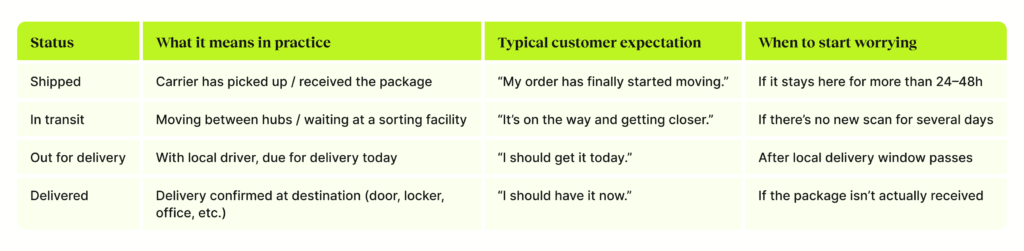
Think of “Shipped” as the moment the parcel officially enters the carrier’s world, “In transit” as the journey, “Out for delivery” as the last mile, and “Delivered” as the finish line.
What actually worries customers is not the label itself, but the time spent at each stage. “In transit” for two days on a standard domestic service is fine. “In transit” for nine days with no new scans, on the same lane, is exactly when the “Where is my order?” emails start.
As a practical rule of thumb:
- Standard domestic services can spend a few days “in transit” without causing concern.
- Express services are held to a much higher expectation; once you go beyond a couple of days, customers expect answers.
- International shipments have a wider range, especially around customs, but still benefit from clear messaging on why they’re taking longer.
Internally, brands that manage this well don’t rely on gut feel. They set thresholds by service, lane, and promise date, and use those to decide when an order is just “in transit” and when it’s officially at risk.
In Transit vs. Out for Delivery: What's the Difference?
“In transit” and “Out for delivery” are two of the most commonly confused tracking statuses. The distinction matters both for customer communication and for how your CX team should respond to customer enquiries about each.
| In Transit | Out for Delivery | |
|---|---|---|
|
What it means |
Package is moving through the carrier network or waiting at a hub |
Package is with a local driver on a delivery route — expected today |
|
Where the package is |
Could be at a sorting facility, on a truck, or in a plane between cities |
On a delivery vehicle in your area |
|
Will it arrive today? |
Not necessarily — may still be days away |
Yes — delivery expected by end of day (typically by 8 PM) |
|
Tracking updates |
Multiple over several days |
Usually one update; next is “Delivered” |
|
Customer action needed |
None — unless significantly delayed past EDD |
Be available to receive or arrange safe delivery location |
|
CX team action needed |
Monitor against EDD; intervene if delayed beyond threshold |
Minimal — only act if delivery attempt fails |
The key practical difference: “In transit” can last days and means the package is still traveling through the network. “Out for delivery” means it’s on a truck in your local area and you should expect it that day. From a CX standpoint, a customer asking about an “in transit” order needs reassurance and an estimated date. A customer asking about an “out for delivery” order that hasn’t arrived by evening needs a different response — a carrier contact to investigate a failed delivery attempt.
Why the “In Transit” Stage Is So Critical for E-commerce Brands
From a customer’s perspective, the post-purchase journey is basically one big question: “Will my order arrive when you said it would?”
“In transit” is where the answer to that question is made or broken. When updates stall or ETAs shift without explanation, customers don’t blame the carrier. They blame the brand whose logo was at checkout.
Operationally, that vague tracking line drives three big downstream effects:
- Support load.
Prolonged or unclear “in transit” statuses are one of the biggest drivers of WISMO tickets. Instead of working on complex issues, your team ends up copy-pasting tracking links. - Cost and complexity.
When you can’t confidently tell a customer what’s happening, you default to reshipping or refunding. Inventory gets tied up, margins shrink, and a single delayed parcel can hit your P&L multiple times. - Loyalty and word of mouth.
Customers will forgive the occasional delay if they feel informed. They’re far less forgiving when they feel ignored or left guessing. How you handle “in transit” issues has a direct impact on whether they shop with you again.
On the flip side, brands that explain statuses in human language, set realistic expectations, and offer options when things go wrong often turn a potential failure point into a proof point of reliability.
Common “In Transit” Problems and What They Actually Mean
Not all “stuck in transit” stories are the same. A few patterns come up again and again.
Oversized or non-compliant packages.
Some parcels don’t fit neatly into automated sortation systems. They require manual handling, which introduces delays and sometimes extra fees. On tracking, these often just look like repeated “in transit” scans at the same facility.
Customs and cross-border delays.
For international orders, “in transit” can hide a lot of complexity: customs checks, document verification, and duty assessments. If paperwork isn’t perfect, the parcel can sit for days while the carrier or broker sorts it out.
Routing errors and strange detours.
Occasionally, packages head in the “wrong” direction before being corrected, or bounce between nearby facilities. To a customer watching the map, this can look absurd. In reality, it’s often the result of network optimisation or a misroute being fixed.
Weather and network disruptions.
Storms, strikes, peak-season congestion and local facility issues can all slow down the flow. Carriers sometimes label this explicitly in tracking; other times, it’s just a series of delayed scans.
Address issues.
If an address is incomplete or inaccurate, the parcel can hover in an “in transit / exception” loop while the carrier decides what to do. Without good address validation and correction flows, this often ends as a return-to-sender.
For retailers, the important thing isn’t memorising every possible carrier code. It’s having a clear internal playbook for what each pattern implies and how you’re going to respond.
A Practical Playbook for Handling Stuck “In Transit” Orders
A simple, structured approach works better than dealing with each case ad-hoc.
First, define what “stuck” means for your business. That might be “no scan for three days on an express service” or “ETA pushed back twice on a time-sensitive product”. Once those thresholds are set, use your tracking platform to automatically flag orders that cross them.
Next, decide how you’ll communicate. A short, honest update like “Your order is taking longer than expected while it’s in transit. The updated delivery window is X–Y. We’re monitoring it closely and will keep you posted” is often enough to prevent a ticket. For more severe cases, give customers a choice: wait, swap the item, or cancel.
Finally, don’t let carriers’ missed commitments quietly eat into your margins. If your contracts include guaranteed transit times, build or adopt workflows that identify those failures and claim refunds or credits. Even when customers are understanding, there’s no reason for you to carry the full financial burden of network issues.
Managing “In Transit” at Scale Without Drowning in Tickets
All of this becomes much easier when “in transit” isn’t something you only see inside carrier portals.
Brands that manage this stage well tend to have three things in place:
- A central tracking layer that aggregates shipments across carriers into a single view for support and operations.
- Smart alerting that flags risky shipments based on gaps in scans, repeated route changes, and shifting ETAs.
- Branded, customer-friendly tracking and notification flows that explain what’s going on in plain language instead of carrier jargon.
Put together, they turn “in transit” from a black box into an early-warning system and a communication opportunity.
Turning “In Transit” into a Trust Signal
“In transit” will never be the most exciting part of online shopping. But it is one of the most important.
When that status lingers with no explanation, it becomes a source of uncertainty, extra work, and churn. When you monitor it closely, explain it clearly, and act quickly when things go off track, it becomes a quiet but powerful trust signal: this is a brand that doesn’t disappear after checkout.
If your team wants to move beyond basic tracking links — to monitor “in transit” shipments in real time, send proactive updates, and recover costs when carriers miss their promises — this is the stage of the journey worth redesigning first.
Frequently Asked Questions
- Why has my package been “In transit” for several days?
It usually means the package is still moving through the network or waiting at a hub. Delays can be caused by volume spikes, routing, weather, customs, or local facility issues. - Does “In transit” mean my package is lost?
Not necessarily. Many packages that appear “stuck” receive a new scan and continue moving. It’s typically treated as lost only after extended inactivity and investigation. - How long is too long for a package to be “In transit”?
For standard domestic shipping, more than a week with no movement is often a red flag. For express, a few extra days is already a concern. International shipments can legitimately take longer. - What should I do if my customer’s order is stuck “In transit”?
Check for recent scans, contact the carrier if it exceeds your thresholds, proactively update the customer, and decide whether to reship, refund, or wait. - Why does my package keep going back and forth between locations?
This usually indicates routing adjustments, network congestion, or a misrouted parcel being corrected. It looks strange but is often recoverable. - Can I get a refund if my package is stuck “In transit”?
If your shipping service includes transit time guarantees, you may be able to claim a refund or credit from the carrier. Many retailers use parcel audit tools to automate this. - What’s the difference between “In transit” and “Out for delivery”?
“In transit” means it’s still moving through the network or sitting at a hub. “Out for delivery” means it’s with a local driver and expected to arrive that day.
8. How can retailers reduce “In transit” delays during peak season?
Plan carrier capacity early, choose appropriate services, set realistic delivery promises, and use proactive tracking, alerts, and customer communication to soften the impact of inevitable delays
Monthly Newsletter
Get practical solutions and insights to tackle real-world post-purchase challenges directly in your inbox