


Quick answer:
A FedEx operational delay means your package is temporarily held within FedEx’s network due to an internal issue — staffing shortages, facility congestion, equipment failure, or a scanning error. It is not caused by the shipper or recipient. Most domestic operational delays resolve within 1-2 business days. If your shipment had a guaranteed delivery window and missed it due to a FedEx operational delay, you may be eligible for a full refund under FedEx’s Money-Back Guarantee. You have 15 days from the invoice date to file.
Key Takeaways
What a FedEx operational delay actually means: It is a disruption caused entirely by FedEx’s own systems or facilities — not weather, not the customer’s address, not a customs hold. FedEx is responsible.
How long it lasts: Minor issues like staffing backlogs or facility congestion: 24-48 hours. Major issues like system outages or peak season overload: 3-7 days. Weather-related operational delays: variable.
Whether you can get a refund: Yes, if the affected shipment used a FedEx service with a delivery guarantee (FedEx Express, FedEx First Overnight, etc.) and the delay caused a missed delivery commitment. File within 15 days.
What to do right now as an operations team: Do not wait for FedEx to notify your customers. Check the tracking sub-reason, communicate proactively, and if 48 hours pass without movement, escalate to FedEx directly.
The cost of doing nothing: Each delayed shipment without proactive communication generates an average of 1-3 WISMO tickets. At $8 per ticket, 50 delayed shipments a month costs you $400-1,200 in support overhead before a single refund is filed.
This guide is for e-commerce operations managers, logistics teams, and businesses shipping at volume with FedEx who need clear answers when an operational delay hits — not generic explanations, but what to do, what to say to customers, and how to recover costs.
Once a package leaves your business, it goes through sorting centers, transport hubs, and local delivery routes before it reaches your customer. While these systems usually work predictably, occasional disruptions can disrupt the flow. Delays can occur at any stage — pickup, transit, sorting, or final delivery.
Some are due to weather or incorrect addresses. Others are called FedEx Operational Delays. These happen when FedEx’s own internal issues — staffing gaps, scanning errors, or facility congestion — disrupt the usual flow.
This article covers everything you need to know about FedEx Operational Delays: what the status means, why it happens, how long it lasts, whether you can get a refund, and what your operations team should do when one hits.
Understanding FedEx Operational Delays
The FedEx operational delay refers to a disruption within FedEx’s own logistics or processing system. It usually stems from issues like technical failures, package misrouting, staffing shortages, or network congestion. Unlike weather or customs delays, this type of delay is caused entirely by internal operations.
You’ll typically see the term “operational delay” in the tracking updates. It shows up when a package reaches a facility but doesn’t move forward as scheduled. This delay can occur at any point during pickup, sorting, or when the package is out for delivery.
When this happens, tracking updates may stop or appear stuck. FedEx also may not immediately offer a new delivery estimate.
Common Causes of FedEx Operational Delays
FedEx Operational Delay messages often leave businesses guessing. You see the status in tracking, but there’s usually no detailed explanation. Here are some common causes of these delays so that you can interpret what’s really going on and prepare for it better next time.
1. Incorrect Recipient Address or Postal Code
One of the most common causes is a wrong or incomplete delivery address. This includes missing apartment numbers, incorrect postal codes, or unclear recipient names.
When the system can’t match the address to a valid delivery route, the package gets pulled for manual inspection. That pause results in a FedEx operational delay when out for delivery, especially if the delivery person has to return the package to the facility.
2. Inclement Weather Conditions
FedEx may update your tracking with an operational delay during harsh weather events like snowstorms, floods, or hurricanes. Even if your area is unaffected, delays at a hub or along the route can stall movement. Unlike other delays, weather-related ones are safety-driven and can affect multiple shipments at once.
3. Mechanical Problems
Unexpected equipment failures can cause sorting and transportation to slow or stop completely. These technical breakdowns often lead to holding packages at the facility until replacements or repairs are made.
4. Volume Overload and Staffing Issues
During peak seasons, FedEx facilities process thousands more packages than usual. High volume, combined with staffing shortages or temporary labor strikes, creates a bottleneck. These internal issues lead to missed scans, longer processing times, and wide-scale delays that fall under the FedEx operational delay category.
5. Technology and Network Updates
FedEx regularly performs system upgrades to improve performance. Sometimes, these updates disrupt tracking tools, delay scan visibility, or temporarily block routing information. While these delays are often brief, they still show up as operational delays in your tracking feed.
6. Security or Compliance Check
Some packages trigger random inspections or compliance reviews, especially international shipments or high-value items. These checks hold the package temporarily at the facility, leading to unplanned delays until the item clears internal screening.
Impact of Operational Delays on Customers
Operational delays can affect how your customers perceive your brand. Even if the delay isn’t your fault, customers associate the entire shipping experience with your business. When a package arrives late, or tracking appears stuck, it creates uncertainty and dissatisfaction. Over time, these moments can hurt customer loyalty and trigger unnecessary support tickets.
- Customers may feel frustrated or anxious when tracking doesn’t update for days.
- Missed delivery timelines can lead to canceled orders, especially for time-sensitive purchases.
- Repeated delays can make your business seem unreliable, even if fulfillment was fast on your end.
- You may see an increase in “Where is my order?” (WISMO) queries, which slows down your support teams.
- Negative delivery experiences can reduce repeat purchases and affect your online reviews.
- Lack of communication during delays often leaves customers feeling ignored or undervalued.
How to Address a FedEx Operational Delay
When a FedEx Operational Delay shows up in your tracking dashboard, the best thing to do is act quickly and strategically to minimize the fallout. Here’s how you can handle it step-by-step.
1. Verify the Delay in Tracking
Check the tracking number on the official FedEx Tracking Page. The term “Operational Delay” usually appears without much explanation, so take note of the last scan location and timestamp. This tells you where the package got held up.
2. Wait 24 Hours Before Escalating
FedEx often resolves minor delays within 24 hours. If the tracking status updates within that time, no action is needed. If not, prepare to escalate.
3. Contact FedEx Customer Service
If the delay continues, contact FedEx and provide the tracking number, shipper, and recipient details, as well as highlight the delay duration. Contact them directly through:
- Phone: Call their business support line for quicker resolution.
- Virtual Assistant or Chat: Available on the FedEx site for basic queries.
- Email Support: Best for detailed follow-ups or if documentation is needed.
4. Ask for Internal Investigation or Escalation
Request FedEx to escalate the case internally, especially if the package is stuck at the same location with no scans. You can also ask for a “trace” to locate the package within the network.
5. Inform Your Customer Proactively
Update your customers before they ask. Be transparent about the issue, let them know it’s an internal FedEx delay, and give them the latest tracking snapshot.
6. Track and File for a Refund
If the delayed package was sent via a time-definite FedEx Express service, you might be eligible for a money-back guarantee.
Here’s how to file a claim:
- Go to FedEx’s Money-Back Guarantee Request page.
- Log in with your FedEx account.
- Enter shipment details and tracking number.
- Explain the delay and request a refund.
Read More on: How to Claim a FedEx Refund for Late Deliveries Easily
FedEx's Response to Operational Delays
When a FedEx Operational Delay occurs, FedEx updates the tracking status to reflect the disruption. They typically continue to scan and monitor the package internally, even if those updates aren’t immediately visible to you. Once the issue is resolved, tracking resumes, and a new estimated delivery date is generated automatically.
FedEx may reroute the package, shift it to an alternate facility, or adjust delivery logistics behind the scenes to reduce further delays. In some cases, they expedite movement through priority channels to catch up with the original schedule. For time-definite services like FedEx Express, they offer a money-back guarantee if the package arrives late due to an operational delay
Preventing Future Operational Delays
Preventing FedEx Operational Delays isn’t always in your hands. These delays are caused by things you can’t fix, like facility congestion, technical glitches, or staffing shortages. Still, there are a few practical ways you can reduce the chances of your packages getting stuck in transit or sitting idle without explanation:
- Double-check address accuracy: Make sure shipping addresses include apartment numbers, landmarks, and correct postal codes. For example, missing a unit number in a high-rise can trigger delivery failure and a delay.
- Avoid peak-day shipments when possible: Try scheduling high-volume shipments during mid-week instead of Monday or Friday, when carrier load tends to spike.
- Use scannable, weather-resistant labels: Ensure your package labels won’t smudge or peel off during transit, especially for long-distance deliveries.
- Set up proactive tracking alerts: Monitor your packages through FedEx tools or integrations so you can act fast if something looks off.
- Use delivery experience management software: These software solutions allow you to automate your tracking process and help you spot delays early, automate follow-ups, and even claim refunds for eligible delivery failures.
Craft Better Delivery Experiences with LateShipment.com
Keeping your customers informed during delays builds trust and reduces support load. When delivery updates go silent, your customers turn to you for answers. That’s why you need a system that keeps track of every shipment in real-time. Manual tracking may work when you’re shipping in low volumes, but it quickly becomes unmanageable as your order volume grows.
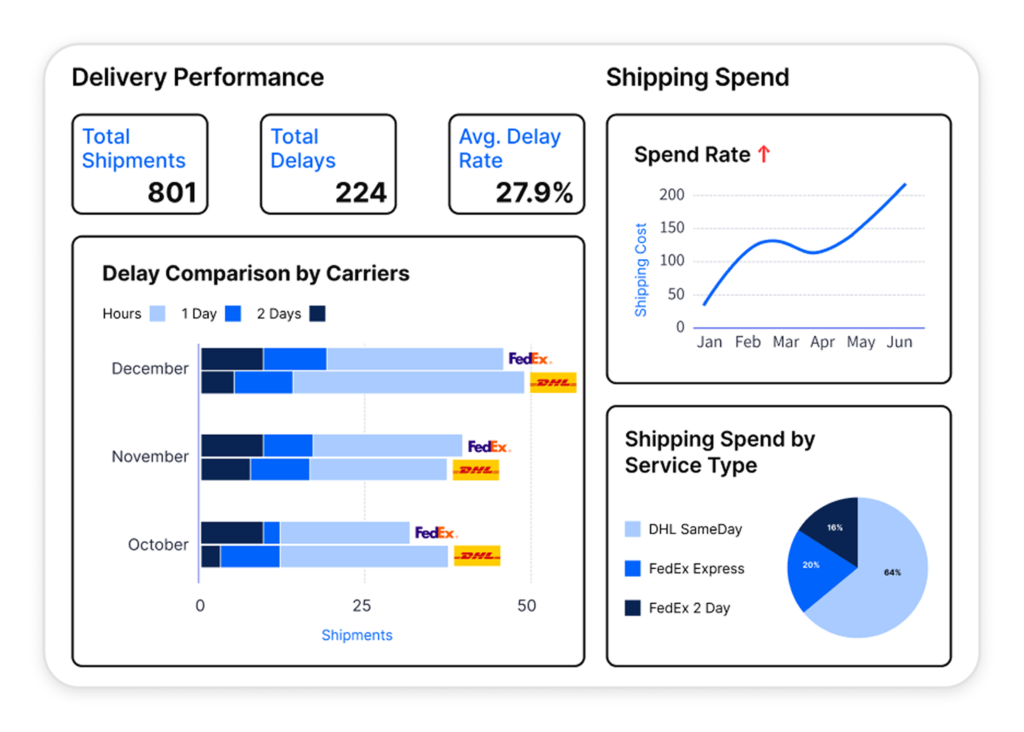
LateShipment.com is an all-in-one solution that automates your entire post-purchase experience. From real-time delivery tracking, delay detection, and branded tracking pages to automated notifications, refund claims, and customer feedback collection, everything happens without manual effort. It integrates seamlessly with your existing tech stack, so you don’t need a full system rebuild to get started.
Thousands of businesses use LateShipment.com to reduce WISMO queries by up to 70% and boost customer satisfaction. Want to do the same? Book a free demo to see how it works.
Frequently Asked Questions
What does a FedEx operational delay mean?
A FedEx operational delay means your package is temporarily held within the FedEx network due to an internal issue on FedEx’s side — not caused by the shipper’s address, the recipient, or customs. Common internal causes include facility congestion, staffing shortages, equipment failures, or system errors. The package is not lost. It is paused until the issue resolves.
How long does a FedEx operational delay last?
Most domestic FedEx operational delays resolve within 24-48 hours. If the cause is a major system outage or peak season overload affecting multiple facilities, it can stretch to 3-5 days. Weather-driven operational delays are tied to conditions on the ground and are less predictable. If your package has not moved in 48 hours, contact FedEx and request a manual trace.
Can I get a refund for a FedEx operational delay?
Yes, if the affected shipment used a FedEx service with a delivery guarantee (FedEx Express, FedEx First Overnight, FedEx 2Day, etc.) and the delay caused a missed delivery commitment. File the refund request within 15 days of the invoice date. Weather-related delays are typically excluded even if they appear as operational delays in tracking. The full refund process is covered here: lateshipment.com/blog/fedex-refund/
Why does my FedEx tracking say “operational delay” with no other details?
FedEx’s tracking system does not always expose the sub-reason for the operational delay in the public-facing status. Internally, FedEx knows what caused it. If you need more detail, log in to your FedEx account and check the shipment detail view, which sometimes shows additional event notes. Alternatively, call FedEx customer support with the tracking number — they can access the facility-level event log.
Is a FedEx operational delay the same as a delivery exception?
Not exactly. A delivery exception is a broader category — it covers any unexpected disruption to delivery, including incorrect addresses, recipient unavailability, weather, and carrier errors. A FedEx operational delay is specifically a carrier-side issue within FedEx’s own network. All operational delays are delivery exceptions. Not all delivery exceptions are operational delays.
What should I tell my customers when FedEx shows an operational delay?
Be transparent and keep it simple. Tell them there is a carrier-level delay on FedEx’s end, their package is still in transit, and you will provide an updated delivery estimate as soon as FedEx confirms one. Avoid blaming FedEx by name — frame it as a logistics delay. Customers who receive a proactive update are far less likely to request a refund or leave a negative review than those who discover the delay on their own.
How do I stop FedEx operational delays from affecting my business?
You cannot prevent carrier-side causes like equipment failures or facility congestion. What you can control: use address validation at checkout to eliminate address-related operational delays, ensure labels are clean and scannable to avoid manual inspection holds, and ship ahead of peak season windows to reduce exposure to volume-driven backlogs. For everything else, the only reliable protection is automated monitoring that catches delays the moment they occur and notifies your team and your customers before a support ticket is filed.
Does FedEx automatically notify me when an operational delay occurs?
FedEx will update the tracking status, but proactive outreach to the merchant or shipper is not guaranteed. If you have set up FedEx Delivery Manager notifications, you may receive an email alert. But for businesses managing high shipment volumes, relying on FedEx notifications alone is not scalable. Delivery experience management tools like LateShipment.com monitor every shipment in real time and flag operational delays the moment they appear in the carrier network, giving your team time to act before the customer notices.
Related Reading
Monthly Newsletter
Get practical solutions and insights to tackle real-world post-purchase challenges directly in your inbox